Interactive Image Gallery & Drag-and-Drop System
Sife Mahmud Simon
esc
F1
F2
F3
F4
F5
F6
F7
F8
F8
F10
F11
F12
~`
!1
@2
#3
$4
%5
^6
&7
*8
(9
)0
—_
+ =
delete
tab
Q
W
E
R
T
Y
U
I
O
P
{[
}]
|\
caps lock
A
S
D
F
G
H
J
K
L
:;
"'
return
shift
Z
X
C
V
B
N
M
<,
>.
?/
shift
fn
control
option
command
command
option
Interactive Image Gallery & Drag-and-Drop System
React-based Visual Gallery with DnD Sorting
Tech Stack
Frontend
React 18
JavaScript (ES6+)
Bootstrap 5
Reactstrap
React Icons
dnd-kit
Backend
None (fully client-side application)
Tools
Create React App
Jest
React Testing Library
Netlify Deployment
web-vitals
Company: Image Gallery
Type:
Status:
Year:
Duration:
Overview
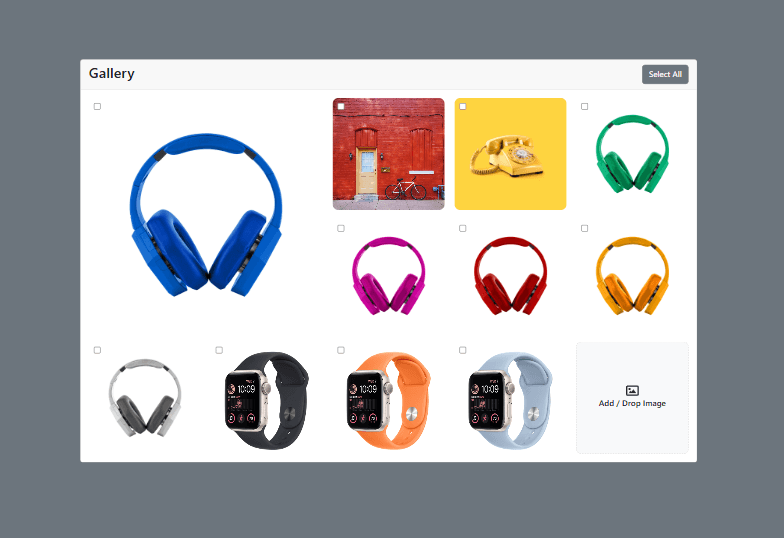
Image Gallery is a fully client-side image management and interaction system built with React. It enables users to visually organize images through drag-and-drop reordering, select multiple images for bulk actions, and upload new images directly from their device. The application uses in-memory state management and requires no backend, making it fast, portable, and easy to deploy.
Features
- Interactive 5-column responsive image grid layout
- Drag-and-drop image reordering using dnd-kit
- Featured 2×2 layout for highlighted images
- Bulk image selection with checkbox controls
- Select all / unselect all functionality
- Client-side image upload using object URLs
- Drag-and-drop file upload support from OS
- Visual hover and drag interaction feedback
- Dynamic state updates without page reload
- Fully client-side execution with no backend dependency
Challenges
- Implementing smooth drag-and-drop reordering with consistent grid layout
- Managing in-memory image state without persistence layer
- Handling file uploads entirely in the browser using object URLs
- Maintaining UI performance during frequent state updates
- Balancing grid responsiveness with featured image layout logic
- Avoiding state complexity in a single-component architecture
Results
- Delivered a smooth and intuitive drag-and-drop gallery experience
- Enabled fully browser-based image management without backend
- Improved user interaction with real-time visual feedback
- Created a lightweight and fast-loading React application
- Demonstrated efficient use of dnd-kit for sortable UI systems
Technologies Used
- React for component-based UI architecture
- dnd-kit for modern drag-and-drop interactions
- Bootstrap for responsive layout and styling
- Reactstrap for UI components
- Create React App for build tooling and development environment
- Netlify for deployment and hosting
Responsibilities
- Built complete image gallery UI in React
- Implemented drag-and-drop sorting with dnd-kit
- Developed bulk selection and delete functionality
- Created client-side image upload system using object URLs
- Managed all application state using React hooks
- Designed responsive grid layout with featured image support
- Deployed application on Netlify with CI-based builds
Architecture
Type: single-page client-side application
Pattern: single-component state-driven architecture
Data Flow: User Actions → React State (useState) → UI Re-render → DOM Update (no backend persistence)
Integrations
- dnd-kit drag-and-drop system for sorting
- Browser File API for image uploads
- Netlify static hosting and deployment pipeline
- Object URL API for temporary image storage
Performance Optimizations
- Lightweight client-only architecture ensures fast load times
- Efficient React state updates for smooth drag interactions
- No backend calls reduce latency and improve responsiveness
- Optimized grid rendering for image-heavy layouts
Testing
- Basic Jest setup via Create React App
- React Testing Library integration (minimal usage)
- Manual UI testing for drag-and-drop interactions
- File upload and selection behavior testing
- Cross-browser compatibility testing
User Roles
User: Browse, upload, select, and reorder images
Admin: Manage gallery content and UI behavior (conceptual)